Photo Investigation
 Granny 2
 Baby In Yellow
 The Cat in Yellow
 Ultimate Custom Night Plus
 Poppy Playtime Chapter 3
 Survive The Night
 The Backrooms
 Poppy Playtime Chapter 4
 Five Nights at Freddy's: Security Breach
 FNAF World
 The Visitor: Massacre At Camp Happy
 Amanda The Adventurer
 Horror Tale
 Poppy Playtime 2
 Labubu Horror
 SCP-087: Into the Abyss
 5 Nights of Horror
 Temple Guardians
What is a snapshot that appears to conceal? Contrast can reveal unusual details or images. Are you perceptive enough to detect every abnormality at Photo Investigation and disclose the truth hidden behind each frame?
Photo Investigation – Investigating Anomalous Photographs
What is Photo Investigation?
Photo Investigation is an analytical game. Instead of battling monsters or fleeing from danger, you will use keen observation skills and image-processing technology to identify hidden details. Only players with the sharpest eyes will be able to fully uncover the truth concealed within each photograph.
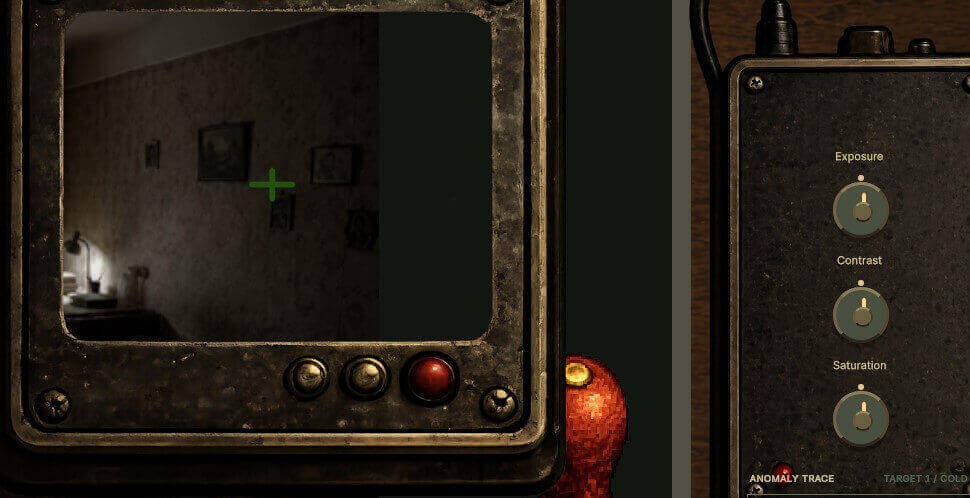
Photo Investigation gameplay
Focus on observation
- Photo Investigation does not require combat or survival against enemies; the greatest challenge lies in your ability to focus.
Use image analysis tools
- The game features an image adjustment system. You can tweak various parameters to reveal traces that are otherwise invisible to the naked eye.
Cunningly hidden anomalies
- Each investigation evokes a mix of curiosity and tension as bizarre details emerge.
What makes Photo Investigation stand out?
- A novel concept centered on photographic investigation.
- A blend of puzzle-solving and psychological horror.
- Unique image adjustment mechanics.
- Sophisticated anomaly design.
- A tense atmosphere without overwhelming intensity.
How to play Photo Investigation
Controls
- Use the mouse to interact with the image and spot any anomalies. Adjust the Exposure, Contrast, and Saturation settings to observe anomalies invisible to the naked eye.
Observe the entire image
- Spend some time looking over the entire scene at the beginning of a level. Pay attention to items, doorways, windows, wall art, and hidden areas, as anomalies might occur anywhere.
Use analysis tools
Utilize the image analysis system to detect anomalies in the following areas:
- Exposure: Increase or decrease brightness to inspect dark areas.
- Contrast: Adjust contrast to highlight unusual details.
- Saturation: Alter color intensity to spot hard-to-see traces.
Detect unusual points
- Use the marking tool to highlight any unusual details you notice, such as shadows, missing objects, or distorted images. A correct identification logs the anomaly, allowing you to continue searching for remaining clues.
Complete the investigation
- A level concludes only when you have found every anomaly in the image. Upon completion, you will unlock new locations featuring higher difficulty levels and more bizarre phenomena.
Tips for effective play
- Avoid missing details.
- Carefully observe the entire picture.
- Continuously adjust the parameters to easily detect any anomalies.
- A lot of anomalies are delicately built and only slightly different from their surroundings, so don't rush.
Ready to explore anomalous images?
By turning seemingly ordinary photographs into a series of enigmatic puzzles, Photo Investigation provides a distinctive investigating experience. Even without spectacular action moments, the game manages to create a sense of suspense through its dismal atmosphere and exceedingly subtle, concealed oddities. Wrap up the investigation and test your mettle in other thrilling horror games including the tense, camera-based chases of FNAF.
Popular Games




New Games






 Creepy Night at Freddy's
  Five Nights at Huggy
  Five Nights at Labubu's Pizzeria
  One Night at Flumpty's 3
  One Night at Flumpty's
  Five Nights at Spike's
  5 Nights with Nubik 3
  5 Nights with Nubik: The Suburbs
  Five Night at Robby's
  One Night at Flumpty's 2
  The Return to Freddy's 3
  It's Not My Neighbor: FNAF